L
o
a
d
i
n
g
.
.
.
1. 报警优化方案Alarm Optimization Scheme
◆ Comply with standards including EEMUA 191 Edition 3, ISA-18.2-2016 and GB/T 41261-2022.
◆ Daily alarm metrics per operator workstation:
Target acceptable daily alarm volume: 144 alarms per day;Manageable maximum daily alarm limit: 288 alarms per day.。
◆ Hourly average alarm metrics per operator workstation:
Target acceptable hourly average alarm volume: 6 alarms per hour;Manageable maximum hourly average alarm limit: 12 alarms per hour.
◆ 10-minute average alarm metrics per operator workstation:
Target acceptable 10-minute average alarm volume: 1 alarm per 10 minutes;Manageable maximum 10-minute average alarm limit: 2 alarms per 10 minutes.
◆ Alarm Priority Distribution:
◆ Three priority levels: approx. 80% Low, approx. 15% Medium, approx. 5% High,
◆ Four priority levels: approx. 80% Low, approx. 15% Medium, approx. 5% High, less than 1% Critical
◆ Special-purpose priority alarms shall be excluded from statistical calculation (e.g. system diagnostic alarms)
◆ Percentage of total alarm load contributed by the top 10 most frequent alarms: maximum 5%
1. Alarm Optimization Scheme – Four Types of Nuisance Alarms
Chattering Alarm:Analysis criterion: An alarm that triggers and clears more than 3 times per minute.
Chattering alarms distract operators and disrupt their focus.
Fleeting Alarm:Analysis criterion: An alarm that clears within 10 seconds after activation.。
Duplicate Alarm:Divided into static duplicate alarms and dynamic duplicate alarms.
Analysis criterion: Two or more alarms activate and clear simultaneously within a ±1-second window.
Duplicate alarms arise from improper alarm configuration design. They create redundant production alerts, distract operators, and consume unnecessary system resources.
Stale Alarms:Analysis criterion: An alarm that remains active continuously for 24 hours after being triggered.
Stale alarms provide no actionable information to operators. They clutter the alarm list and hinder operators from identifying and responding to new, meaningful alarms.
1. Alarm Optimization Scheme — Alarm Reduction Measures
Alarm Deadband Configuration:
Most deadband parameters in the DCS system retain the factory default value of 2%, without customized deadband settings for individual tags.
After an alarm is triggered, if the process value returns to normal yet stays within the deadband range, the alarm will fail to reset automatically.
It is required to configure reasonable alarm deadband values for process tags.
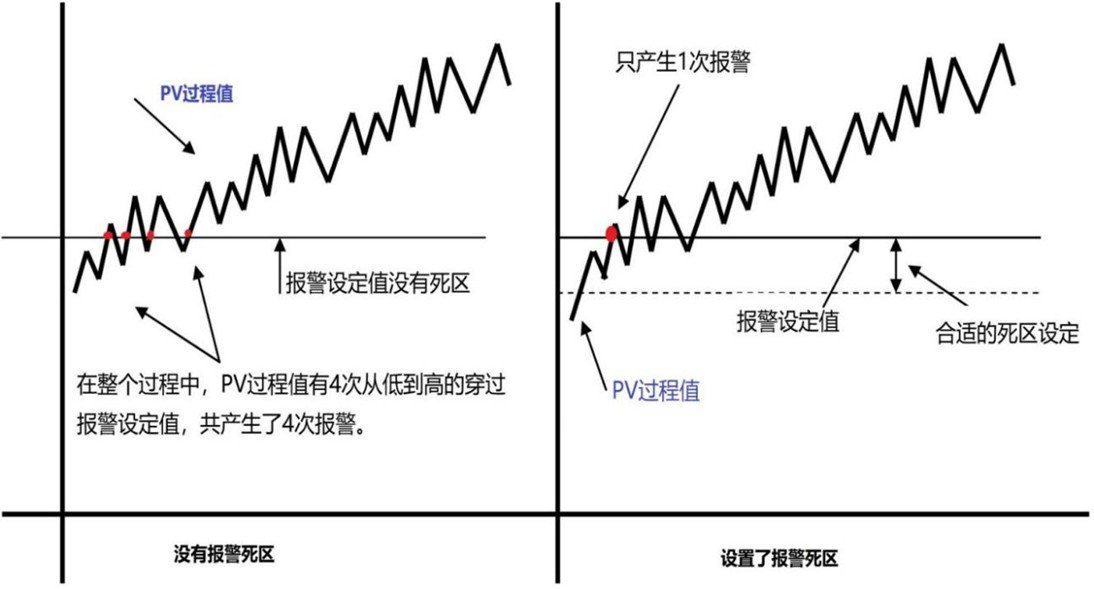
Deadband shall be configured for every analog point; otherwise, chattering alarms will be triggered.
Alarm Delay Configuration:
For chattering alarms and fleeting alarms, alarm delay can be configured to achieve nuisance alarm reduction.
When an alarm condition is met, the alarm signal will not be issued immediately; it will only activate after the preset delay period elapses. If the alarm condition clears within the set delay time, no alarm signal will be triggered.
This delay mechanism provides a time window for the process to stabilize or self-correct before an alarm is raised, lowering the probability of false alarms.
Alarm delay is commonly applied to LOW priority alarms. For HIGH or MEDIUM priority alarms, the applicability of alarm delay shall be evaluated based on specific process conditions.
PV Value Filtering:
PV value filtering is generally applicable to analog tags to reduce signal noise, and it is widely used in loop control.
Static Duplicate Alarms:
Signals are transmitted to different modules after entering the system through sensors. Alarms shall normally be configured at the terminal that processes PV values.
Dynamic Duplicate Alarms:
Definition: Due to signal transmission and processing logic, the same alarm condition is triggered multiple times at different timestamps or in different modules. Dynamic duplicate alarms not only distract operators but also delay alarm response actions.。
a. Alarms shall be configured at the final stage of signal processing, i.e., within the control modules where operators perform direct interactions
b. Conduct thorough review and tuning of alarm logic to avoid unnecessary alarm triggering during signal transmission.
c. Implement alarm suppression strategies to allow the same alarm to trigger only once within a defined time window.
1. Alarm Optimization – LDPE Unit Analysis
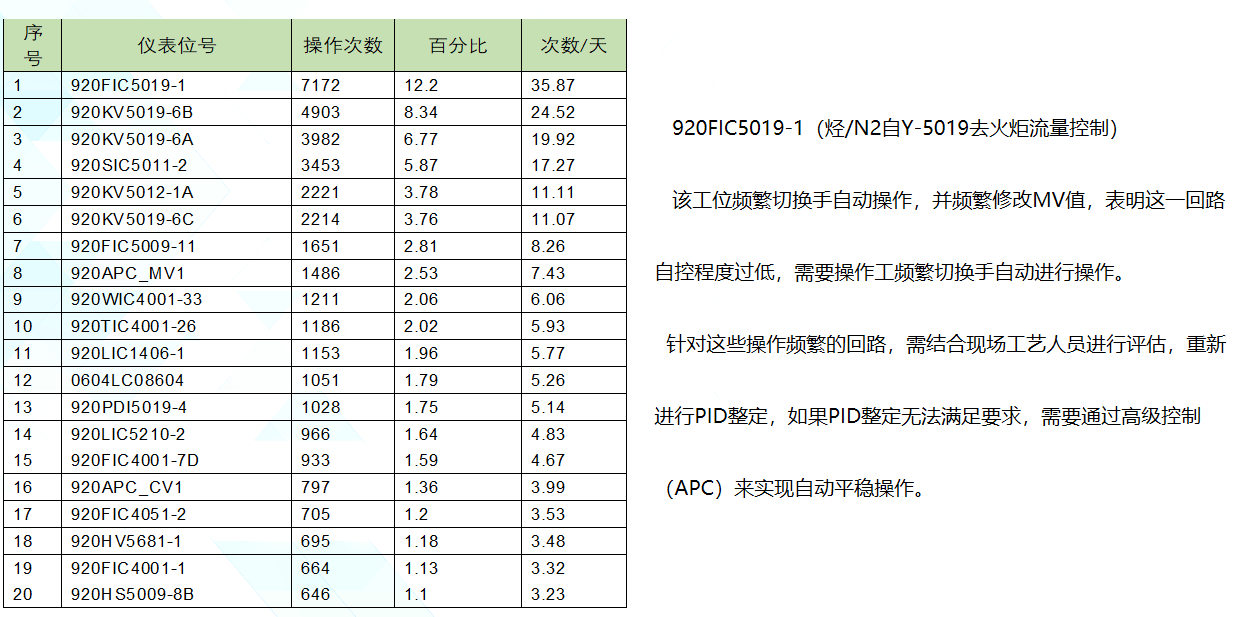
Statistical analysis was performed on 200 days of operational data from the LDPE (Low Density Polyethylene) unit.
The total number of operational records amounted to 75,512, among which the top 20 workstations generated 45,506 operations, accounting for 60% of the total.
Chattering Alarm
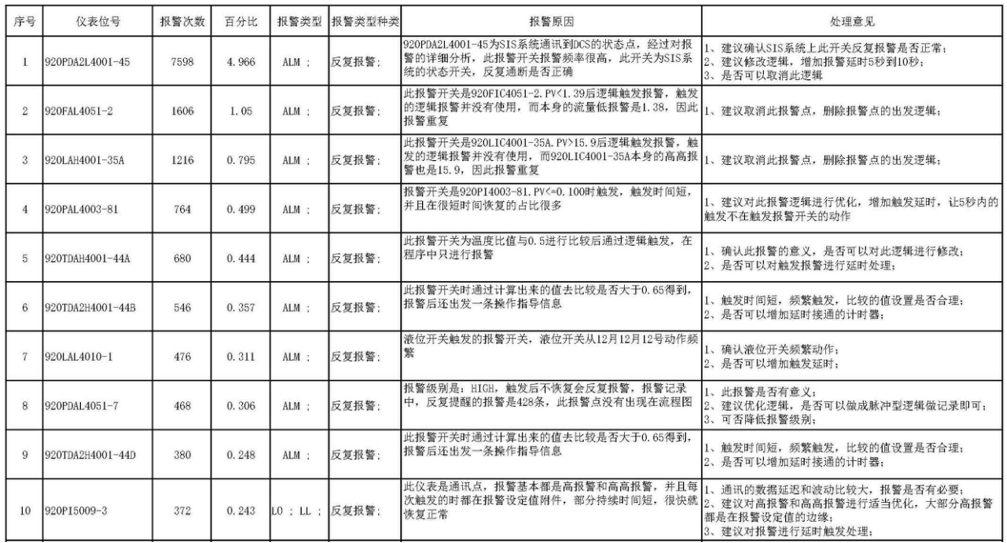
瞬闪报警 (Fleeting Alarm)
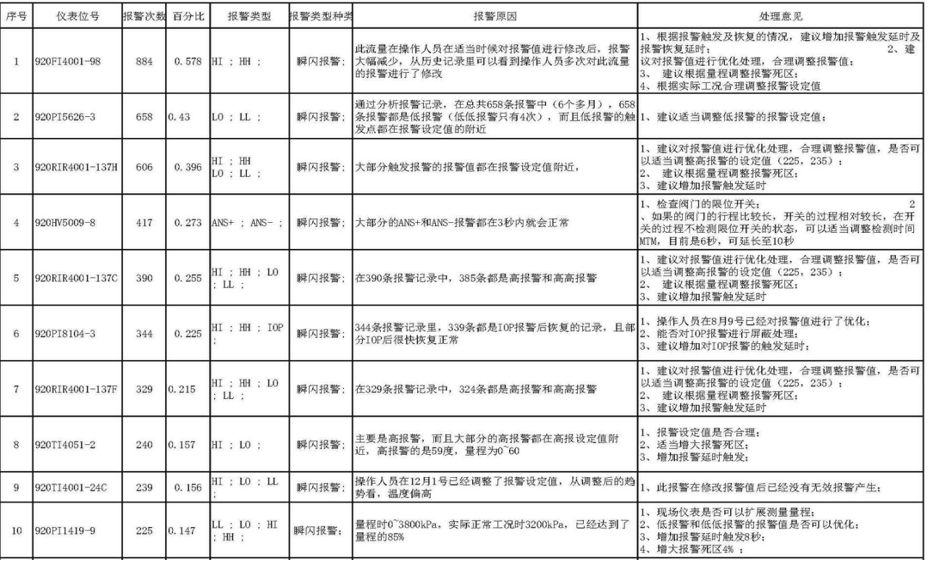
重复报警 (Duplicate Alarm)
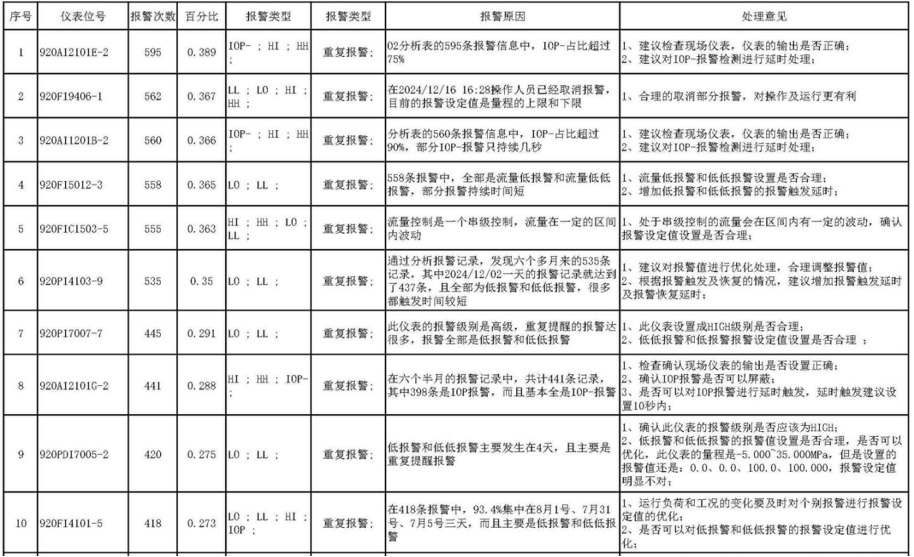
僵尸报警 (Stale Alarms)
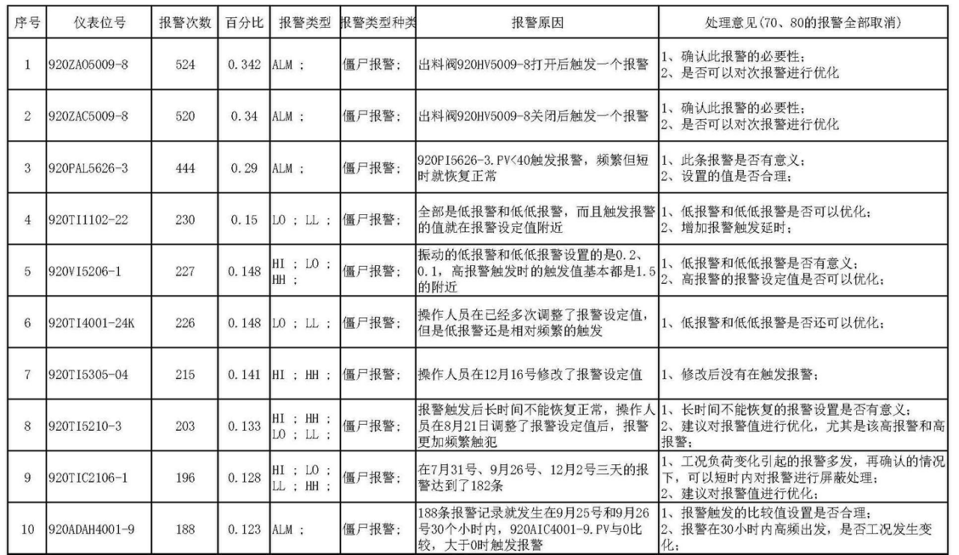
2. Screen Blank Software
Blank Screen Status of Operator Workstation
When the control system has no active alarms and the production process runs stably, the operator workstation will enter the blank screen state.
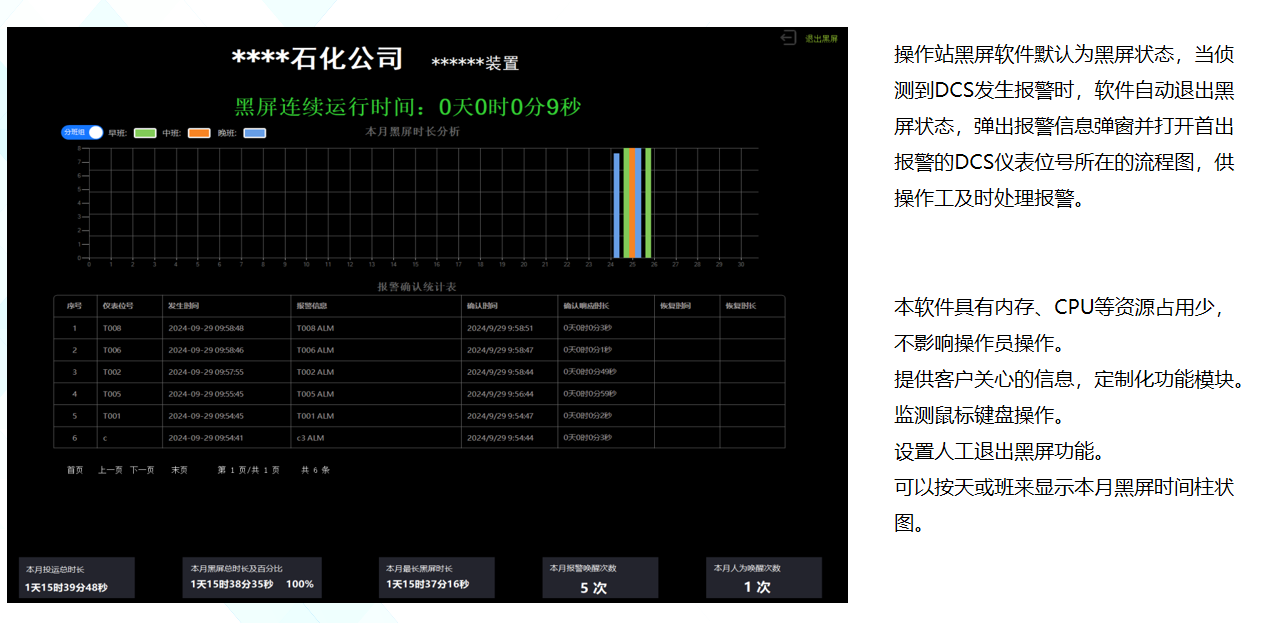
2. Blank Screen Software – Function Description
Blank Screen State of Operator Workstation
The operator workstation will switch to blank screen state when there are no active alarms in the control system and the production process operates stably.
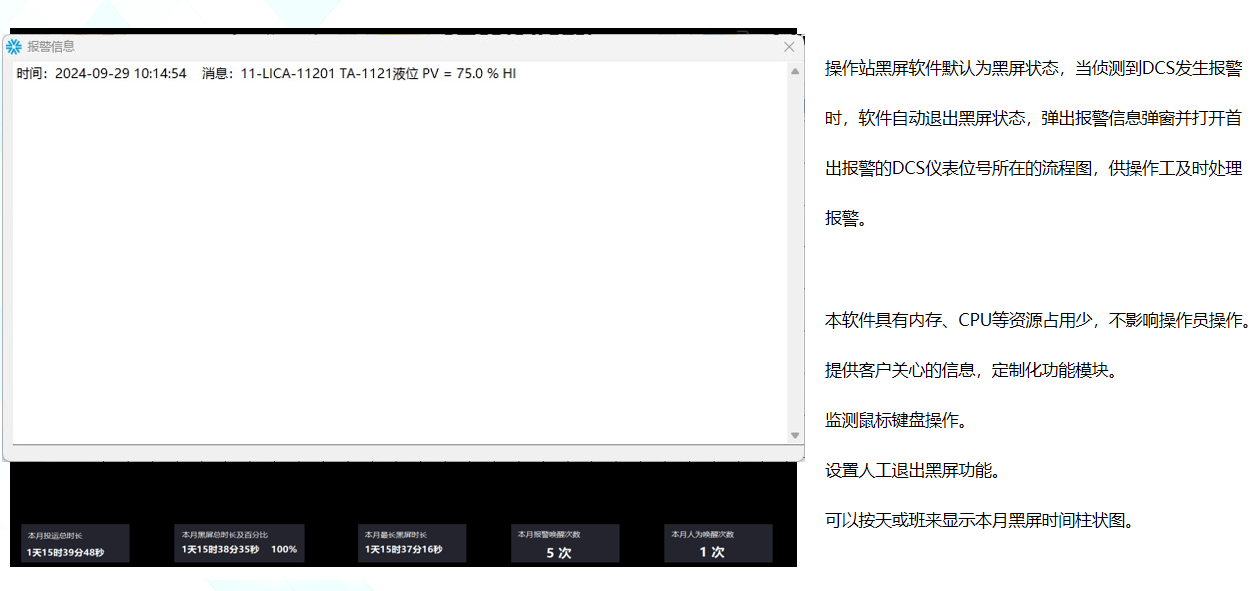
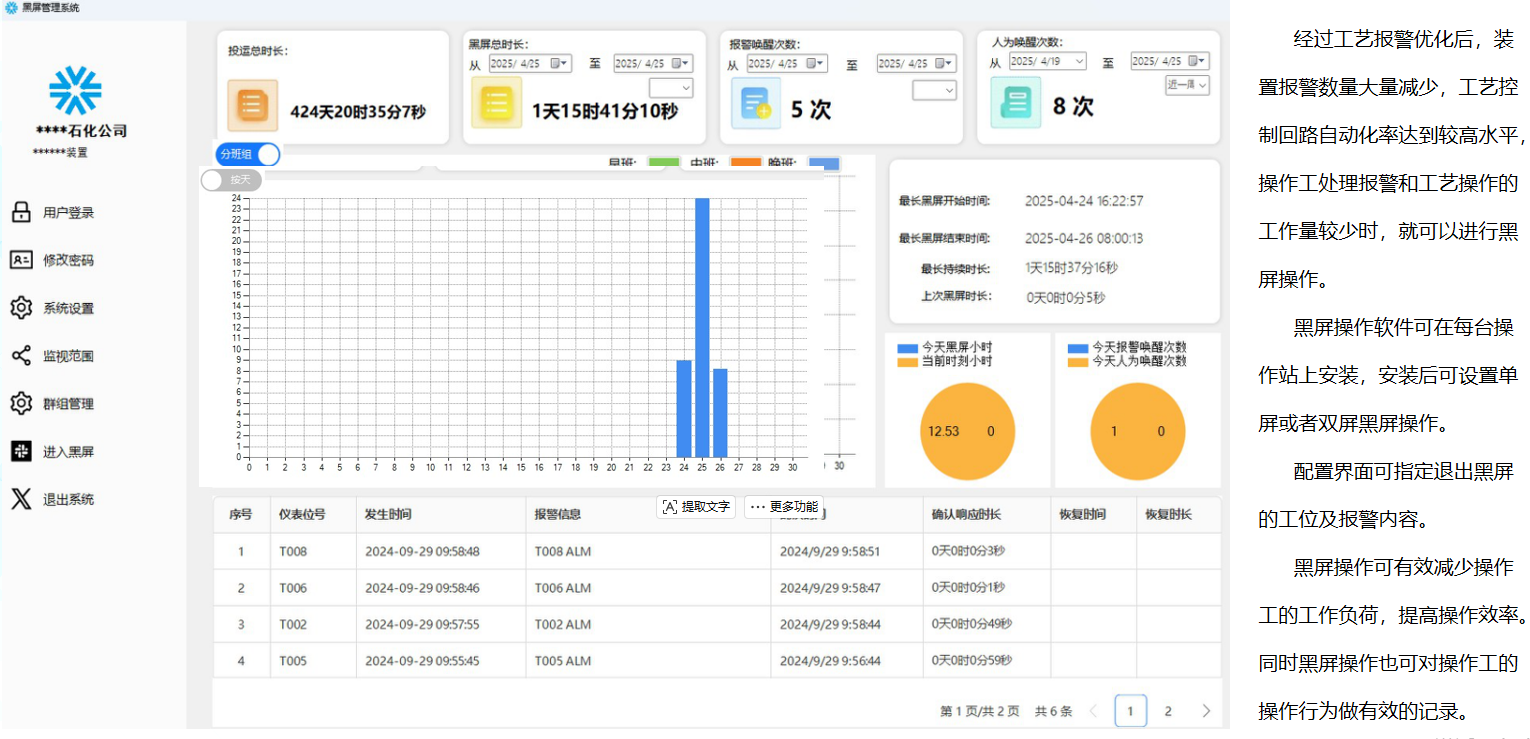
2. Blank Screen Software – Software Overview
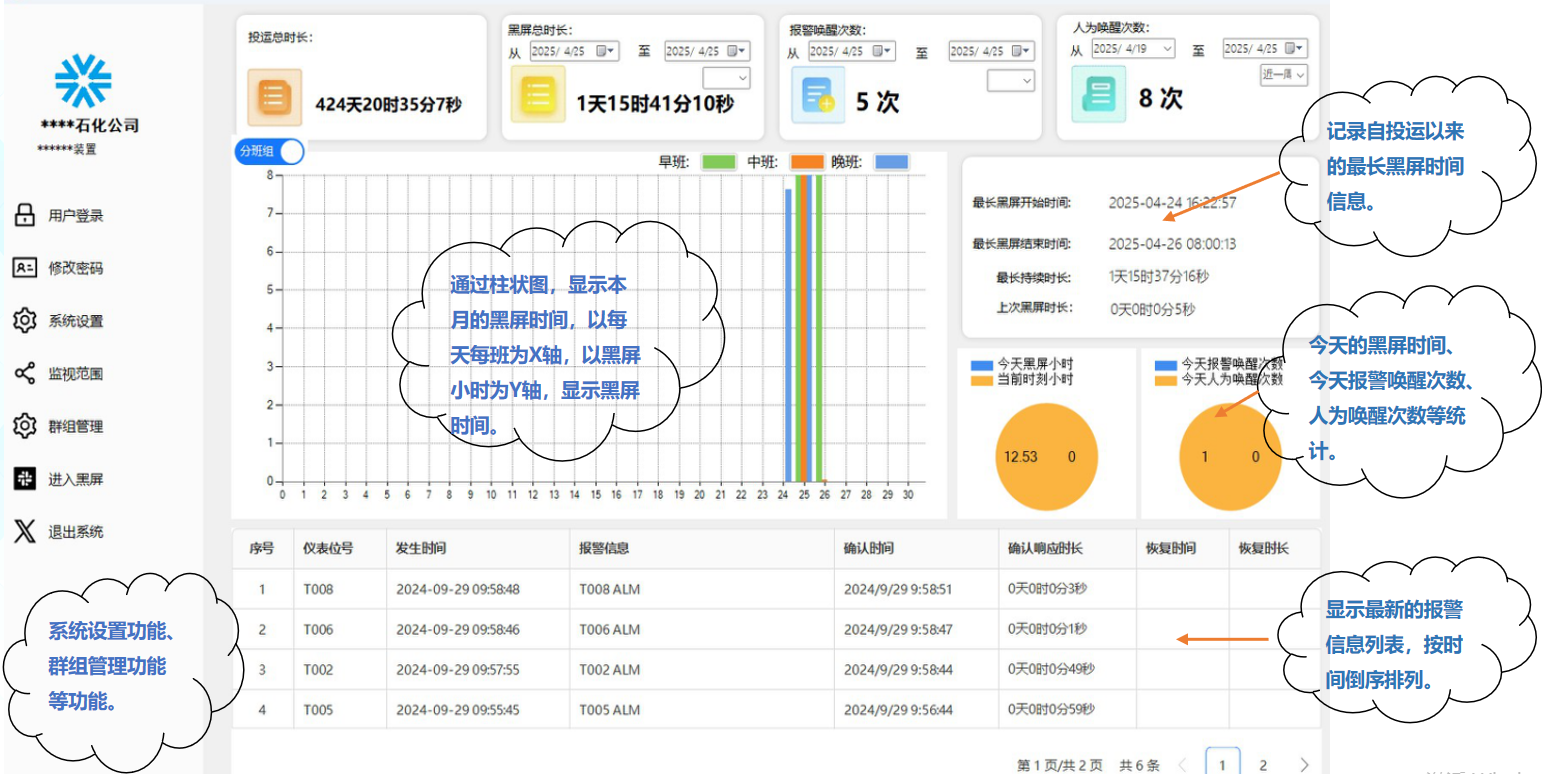
Blank Screen Management Interface
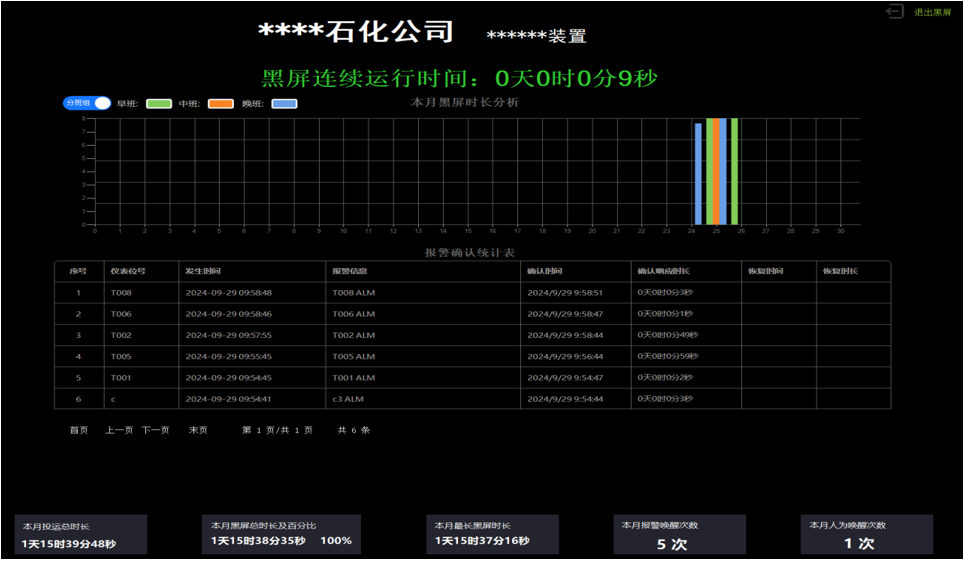
2. Blank Screen Software – Function Description
Blank Screen Operation
黑屏管理界面功能
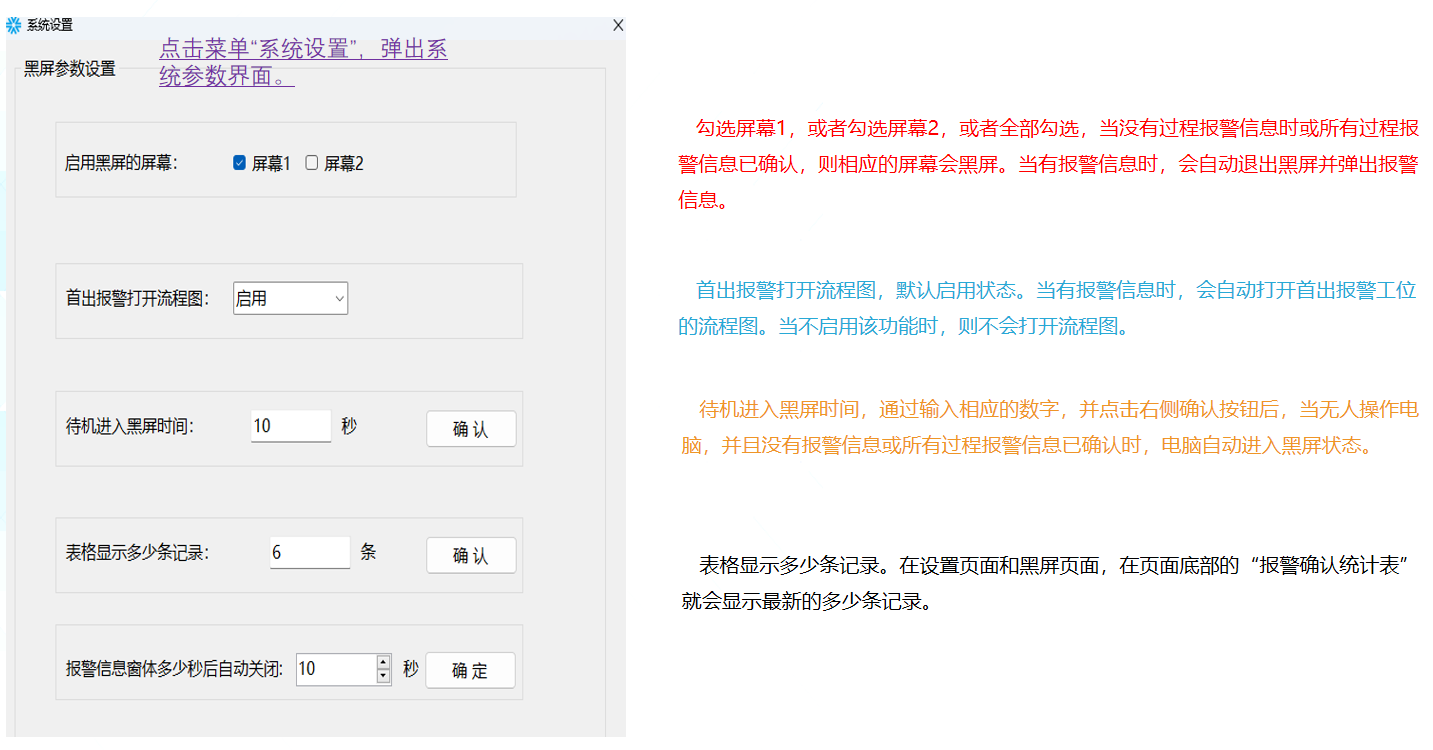
系统设置
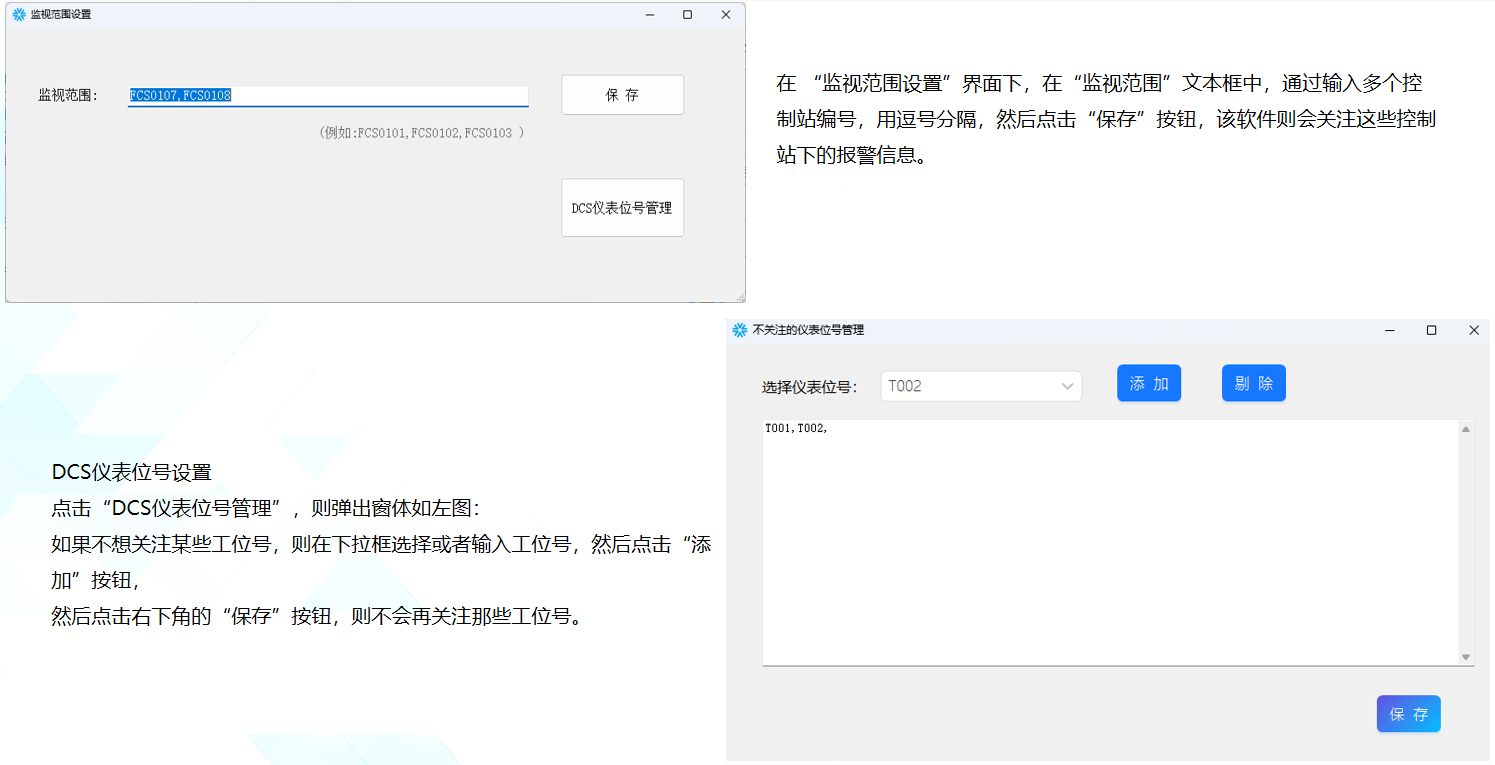
监视范围设置
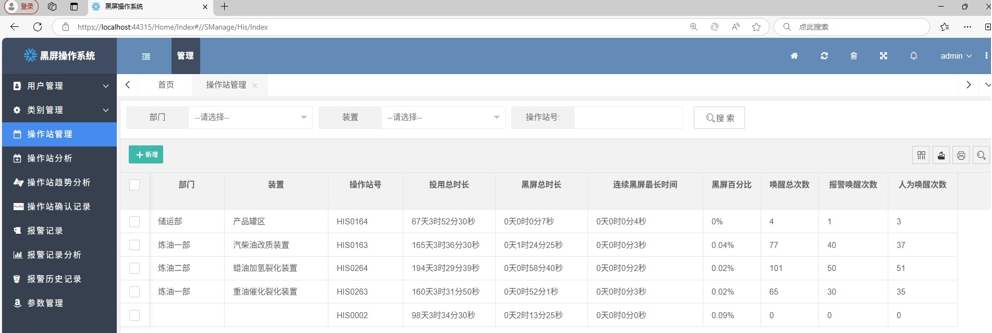
服务器端软件
English Translation (Industrial DCS Standard, Consistent Terminology)
Server-side Operator Workstation Management
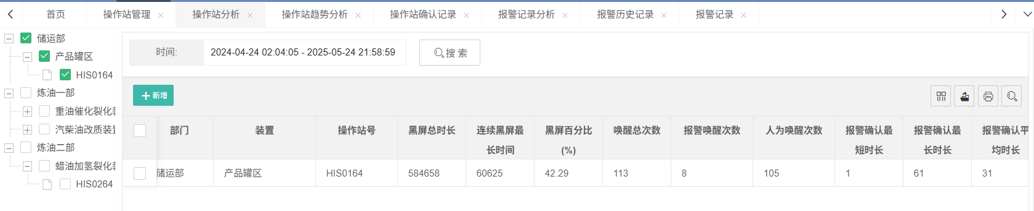
It aggregates the operating status of all operator workstations, supporting data filtering, comparison and analysis.
Operator Workstation Analysis
Supports filtering selected operator workstations to aggregate their operation data and conduct comparative analysis.
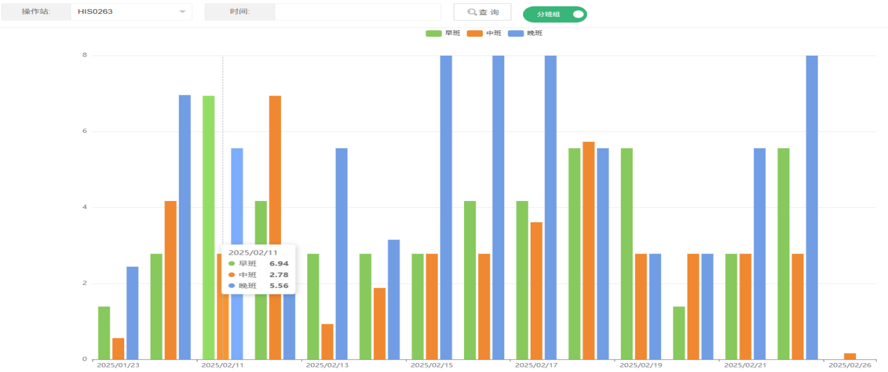
Operator Workstation Trend Analysis
Displays daily operating status of each workstation intuitively via bar charts.
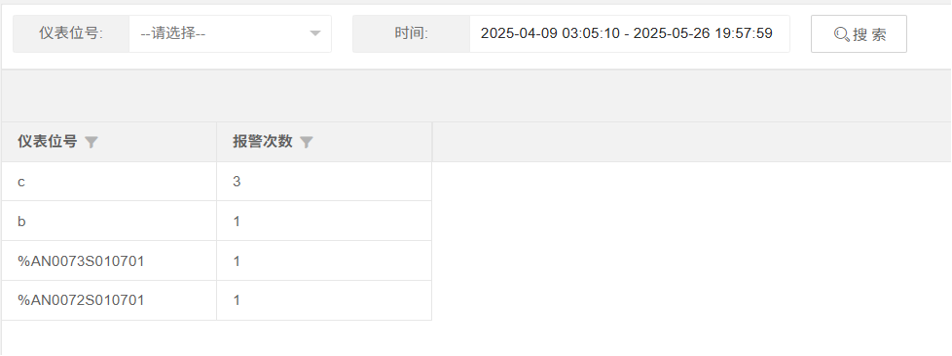
Alarm Log Analysis
Queries all instrument tags that generated alarms within a specified time period and sorts them by alarm frequency for further analysis and troubleshooting.。
服务器端软件
| 操作站分析 | ||
|---|---|---|
可以按部门或者装置或者某个某些操作站名称进行检索查询,可以指定某时间段查询。 | ||
本页面可以查看各个操作站的 “黑屏总时长”、 “连续黑屏最长时间”、 “黑屏百分比”、 “唤醒总次数”、 | ||
“报警唤醒次数”、 “人为唤醒次数” 、 “报警最短时长” 、 “报警最长时长” 、 “报警平均时长” 。 |
| 操作站趋势分析: | ||
|---|---|---|
可以按班组;操作站站号进行检索查询,可以指定某时间段查询。 | ||
本页面按天显示操作站的黑屏时间,可以分早中晚班统计。 |